The Crawl-Index-Rank Pipeline
Why This Lesson Is the Most Important One You'll Take
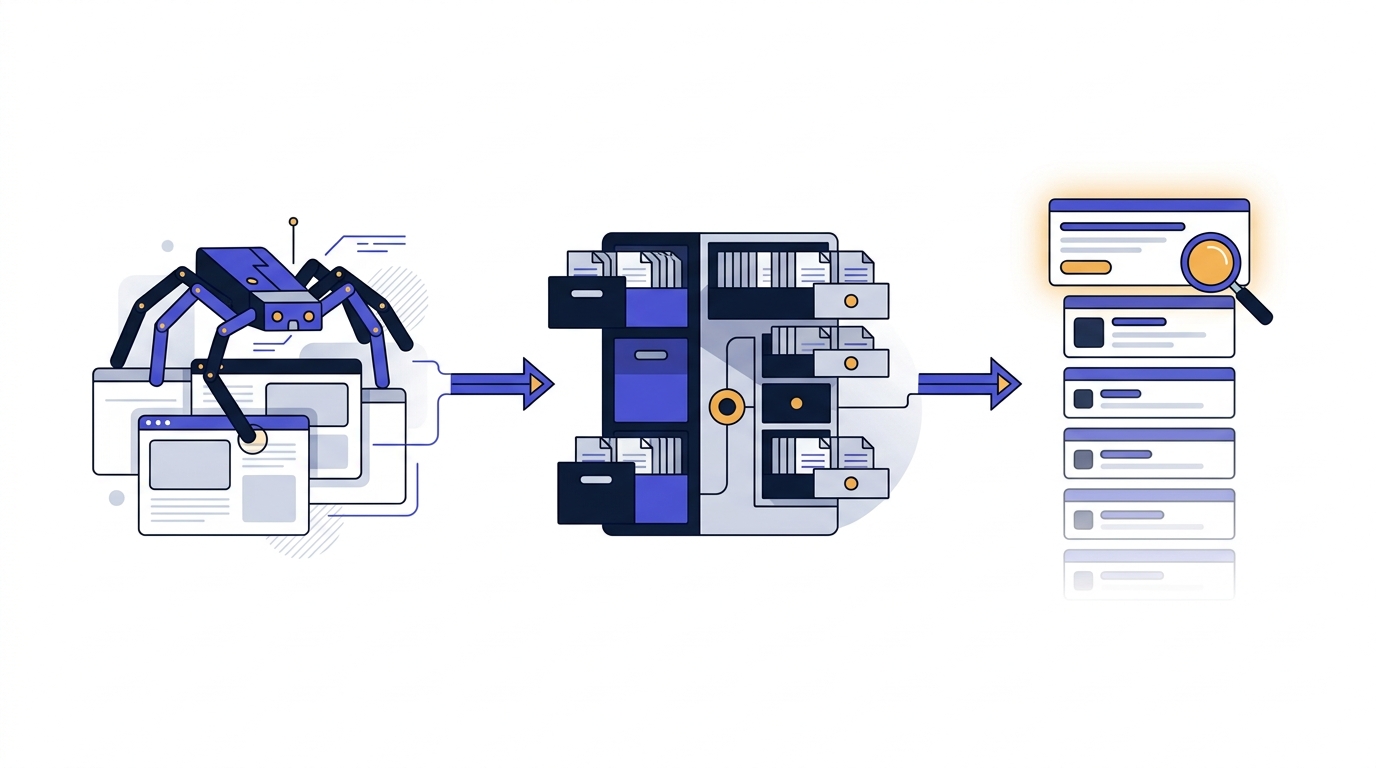
If you remember nothing else from this entire masterclass, remember this: every page that has ever ranked in Google has passed through three distinct stages. It was discovered and fetched. It was processed and stored. And then, for a specific query, it was ordered against millions of other candidates. We call this the crawl-index-rank pipeline, and it is the diagnostic backbone of professional SEO.
Most people who struggle with SEO struggle because they conflate these three stages. They see a page that isn't ranking and immediately reach for the usual suspects — backlinks, content length, keyword density — without first asking the more fundamental question: has Google even indexed this page? A page that isn't in the index cannot rank. Not for any query. Not ever. And yet the prescriptions you'll see online — "add more internal links", "improve your E-E-A-T" — are ranking-stage interventions being applied to crawling-stage or indexing-stage problems.
By the end of this lesson, you'll be able to look at any underperforming page and ask, with surgical precision: which stage is failing? That single skill separates SEO practitioners who solve problems from those who throw tactics at symptoms. Let's unpack each stage in turn.
Stage 1: Crawling — How Google Finds You
Crawling is the process by which Googlebot — Google's web crawler, a piece of software running on Google's infrastructure — discovers URLs and fetches their content. Think of it as a very fast, very patient librarian who follows links from page to page, taking a copy of each one back to headquarters.
Googlebot discovers new URLs in three main ways:
- Following links from pages it already knows about — this is why internal linking and earning external backlinks matters even for discovery, not just authority.
- XML sitemaps you submit through Google Search Console, which act as a guided tour of what you want crawled.
- Direct submission via the URL Inspection tool in Search Console, useful for new or updated pages.
What can block a crawl
A page is unreachable to Googlebot if any of the following are true:
- Your robots.txt file disallows the URL or directory. This is the most common self-inflicted SEO wound — a single misplaced line can deindex an entire site.
- The page returns a server error (5xx) or is unreachable when Googlebot visits.
- The page is behind a login, paywall, or requires JavaScript that Googlebot can't render within its resource budget.
- Excessive redirect chains, infinite parameter loops, or extremely slow response times cause Googlebot to give up.
Crawl budget — and why most sites shouldn't worry about it
Google allocates each site a crawl budget — roughly, the number of URLs Googlebot is willing to fetch from your domain in a given period. This budget is determined by two factors: how much your server can handle without slowing down (crawl capacity), and how much Google wants to crawl you (crawl demand, driven by popularity and freshness).
For sites under ~10,000 pages, crawl budget is almost never the bottleneck. Where it matters is for large e-commerce sites, news publishers, and any site that generates millions of URL variations through faceted navigation or parameters. If your site has 200 product pages, stop worrying about crawl budget and start worrying about whether those 200 pages deserve to be indexed in the first place.
Stage 2: Indexing — Why Being Crawled Isn't Enough
Here is where most SEOs lose the plot. Being crawled does not mean being indexed. Crawling is just fetching. Indexing is the decision — made by Google's systems — to actually store your page, understand it, and consider it eligible to appear in search results.
When Google indexes a page, it does several things: it renders the page (executing JavaScript to see what a user would see), it extracts the content and identifies the primary topic, it canonicalises the URL (deciding which version is the "real" one if duplicates exist), and it stores a compressed representation in the index.
The index is curated, not exhaustive
This is the mental model shift most people never make: Google does not try to index the whole web. It actively chooses what to keep. The web is full of duplicate product descriptions, auto-generated tag pages, thin affiliate content, scraped articles, and pages created purely to capture long-tail keywords. Google's index would collapse under its own weight if it stored all of it, and even if it could, the results would be worse for users.
So Google triages. In Google Search Console, you'll see pages flagged with statuses like:
- "Crawled — currently not indexed" — Google fetched the page, looked at it, and decided it wasn't worth keeping. This is a quality signal, not a bug.
- "Discovered — currently not indexed" — Google knows the URL exists but hasn't bothered to crawl it yet, often because it predicts low value.
- "Duplicate, Google chose a different canonical" — Google decided another URL represents this content better.
- "Soft 404" — the page returned a 200 status but looks empty or error-like to Google.
What "thin, duplicate, or low-value" actually means
These terms get thrown around loosely. Let's be precise:
- Thin means the page doesn't satisfy the implicit promise of its URL or title. A 200-word post titled "The Complete Guide to Mortgage Refinancing" is thin not because of its word count but because of the gap between promise and substance.
- Duplicate means substantially similar content exists elsewhere — either on your own site (templated location pages, paginated archives) or across the web (boilerplate manufacturer descriptions).
- Low-value means the page exists but adds nothing a reasonable user couldn't get from ten other sources. The canonical example: AI-generated content that summarises the top three results without first-hand experience or original insight.
Your job at the indexing stage is to give Google reasons to keep your pages: originality, depth, evidence of expertise, internal links from pages that are themselves trusted, and a structure that signals you've thought carefully about what this page is for.
A page can be crawled but not indexed, and indexed but never ranked well — diagnosing which stage is failing is half of SEO.
Stage 3: Ranking — Ordering What's Already In
Only once a page is in the index does ranking enter the picture. Ranking is the process by which Google, for a specific query, orders all eligible indexed pages and returns what it predicts is the most useful set of results.
This is where the famous "200+ ranking factors" come in — relevance to the query, content quality signals, link authority, user experience signals like Core Web Vitals, freshness, language, location, device, personalisation, and the systems Google uses to estimate E-E-A-T (Experience, Expertise, Authoritativeness, Trustworthiness). We'll go deep on each of these throughout the course.
What's critical to grasp now is that ranking factors are signals, not switches. There is no single dial you can turn up to guarantee position one. Hundreds of signals combine, weighted differently depending on the query and the inferred intent behind it. A query like "how to tie a tie" rewards different signals than "best business bank account UK" — the first wants a quick visual explainer, the second wants a recently-updated comparison from a trusted financial source. Same Google, completely different weighting.
This is also why you should treat anyone quoting an exact "ranking factor list with percentages" with deep suspicion. They are either selling you something, or they don't understand how the system actually works.
Ranking is a moving target
Ranking isn't computed once and stored. It happens at query time, every time, against an index that itself is constantly being refreshed. A page that ranks third today might rank seventh tomorrow not because anything changed on your end, but because a competitor published something better, or Google rolled out an update, or the query's intent drifted (think: "covid symptoms" in 2019 versus 2020).
The healthiest mindset: ranking is a black box you influence with strong signals; you don't control it. What you can control is doing the fundamentals well, consistently. That's exactly what compounds into durable rankings over time.
Exercise: Diagnose Your Own Pipeline
Before moving to the next lesson, do this — it takes ten minutes and will rewire how you think about your own site.
- Pick three pages from your own website: one that's performing well, one that's underperforming, and one new page you've published recently.
- For each, run a site search in Google:
site:yourdomain.com/exact-url-path. If the page appears, it's indexed. If it doesn't, it isn't — regardless of what your CMS tells you. - Then open Google Search Console and use the URL Inspection tool on each one. Read the status carefully: is it "URL is on Google"? "Crawled — currently not indexed"? "Discovered — currently not indexed"?
- Write down, for each page, which stage of the pipeline it's currently sitting at. This is your starting diagnostic baseline for the rest of the course.
Putting It All Together: The Diagnostic Habit
When a page isn't performing, resist the urge to immediately optimise. Instead, walk down the pipeline in order:
- Is it being crawled? Check robots.txt, server logs if available, and the Crawl Stats report in Search Console. If Googlebot can't fetch it, nothing else matters.
- Is it being indexed? Use URL Inspection. If it's crawled but not indexed, the problem is quality, duplication, or canonicalisation — not links or on-page tweaks.
- Is it ranking, just not well? Now, and only now, are the ranking-stage interventions relevant: search intent alignment, content depth, internal linking, backlinks, E-E-A-T signals, technical performance.
Most SEO advice on the internet skips straight to step three. That's why most SEO advice fails. The practitioners who consistently move the needle are the ones who diagnose before they prescribe.
In the next lesson, we'll turn our attention to what actually happens once your page is ranked — the modern SERP. Because "ranking number one" doesn't mean what it used to. AI Overviews, featured snippets, People Also Ask boxes, map packs and shopping carousels have transformed the result page into a battleground of features, where owning the right real estate matters more than owning a position.
Key Takeaway
The three stages, internalised:
- Crawling = Googlebot fetches your page. Blocked by robots.txt, server errors, or unreachable resources.
- Indexing = Google decides to store and consider your page. Blocked by thin, duplicate, or low-value content — the index is curated, not exhaustive.
- Ranking = Google orders indexed pages for a specific query. Influenced by hundreds of weighted signals; never a single switch.
Half of professional SEO is asking the right diagnostic question: which stage is failing? Get that right and every other lesson in this course becomes ten times more powerful.
Enjoyed this preview? Enrol to unlock all 43 lessons + your certificate.
Training a team? Buy seats for your team →